Wednesday, July 23, 2014

How to import / export or backup sqlite db dump in your Android App

Hi there!

Today i'm gonna share with you how to import and export your database date using sqlite in your android application.

We will see how to create a sqlite database using SQLiteOpenHelper, how to populate it once while initializing and how to import and export it.

First Step: Defining an Entity

For this example we will implement a LanguageEntitty like shown bellow.
 
public class LanguageEntity {
    
    private int id;
    private String language;
    
    public int getId() {
        return this.id;
    }
    public void setId(int id) {
        this.id = id;
    }
    public String getLanguage() {
        return this.language;
    }
    public void setLanguage(String language) {
        this.language = language;
    }
} 

Defining our DbFactory

The DbFactory will be responsible for defining all database and table data in a central place. It is also responsible for creating the first database instance and tables if it not exits already. It has the methods to import or export the database as you need.

import java.io.File;
import java.io.FileInputStream;
import java.io.FileOutputStream;
import java.io.IOException;
import java.io.OutputStream;
import java.nio.channels.FileChannel;

import android.content.ContentValues;
import android.content.Context;
import android.database.sqlite.SQLiteDatabase;
import android.database.sqlite.SQLiteOpenHelper;
import android.os.Environment;
import android.util.Log;


/**
 * Class responsible for defining and creating, updating or deleting DB, tables and its columns.
 * 
 * @author Ricardo Ferreira
 * @version 1.0
 * @since 17/07/2014
 */
public class DbFactory extends SQLiteOpenHelper {

    // Database & Name Version
    private static final int DATABASE_VERSION = 1;
    private static final String DATABASE_NAME = "yourdatabasename.db";

    // your table name. In this example language
    public static final String LANGUAGE = "language";
    public static final String LANGUAGE_ID = "language_id";
    public static final String LANGUAGE_NAME = "language_name";
    
    // used SQL statements
    private static final String UNIQUE = " UNIQUE ";
    private static final String INTEGER = " INTEGER ";
    private static final String TEXT = " TEXT ";
    private static final String INTEGERC = " INTEGER, ";
    private static final String TEXTC = " TEXT, ";
    private static final String PARENTHSE_LEFT = " ( ";
    private static final String PARENTHSE_RIGHT = " ) ";
    private static final String CREATE_TABLE_IF_NOT_EXISTS = "CREATE TABLE IF NOT EXISTS ";
    private static final String INTEGER_PRIMARY_KEY = " INTEGER PRIMARY KEY, ";
    private static final String DROP_TABLE_IF_EXISTS = "DROP TABLE IF EXISTS ";

    private final String DB_FILEPATH;

    public DbFactory(Context context) {
        super(context, DATABASE_NAME, null, DATABASE_VERSION);
        final String packageName = context.getPackageName();
        DB_FILEPATH = "/data/data/" + packageName + "/databases/yourdatabasename.db";
    }

    @Override
    public void onCreate(SQLiteDatabase db) {
        createLanguageTable(db);
        populateLanguageOnce(db);
    }

    private void populateLanguageOnce(SQLiteDatabase db) {
        String [ ] languages = new String [ ] { "C", "C++", "C#", "Java" };
        for (String language : languages) {
            insertLanguages(db, language);
        }
    }

    private void insertLanguages(SQLiteDatabase db, String value) {
        ContentValues columnValuePair = new ContentValues();
        columnValuePair.put(LANGUAGE_NAME, value);
        db.insert(LANGUAGE, null, columnValuePair);
    }

    @Override
    public void onUpgrade(SQLiteDatabase db, int oldVersion, int newVersion) {
         dropTables(db);
         recreateTables(db);
    }

    private void dropTables(SQLiteDatabase db) {
        db.execSQL(DROP_TABLE_IF_EXISTS + LANGUAGE);
    }

    private void recreateTables(SQLiteDatabase db) {
        onCreate(db);
    }

    private void createLanguageTable(SQLiteDatabase db) {
        final StringBuilder sql = new StringBuilder();
        sql.append(CREATE_TABLE_IF_NOT_EXISTS);
        sql.append(LANGUAGE);
        sql.append(PARENTHSE_LEFT);
        sql.append(LANGUAGE_ID);
        sql.append(INTEGER_PRIMARY_KEY);
        sql.append(LANGUAGE_NAME);
        sql.append(TEXTC);
        sql.append(UNIQUE); // ensures uniqueness for languages
        sql.append(PARENTHSE_LEFT);
        sql.append(LANGUAGE_NAME);
        sql.append(PARENTHSE_RIGHT);
        sql.append(PARENTHSE_RIGHT);
        Log.d("CREATE_TABLE_LANGUAGE", sql.toString());
        db.execSQL(sql.toString());
    }

    /**
     * Copies the database file at the specified location 
     * over the current internal application database.
     * */
    public boolean importDatabase(String dbPath) throws IOException {

        // Close the SQLiteOpenHelper so it will
        // commit the created empty database to internal storage.
        close();
        File newDb = new File(dbPath);
        File oldDb = new File(DB_FILEPATH);
        if (newDb.exists()) {
            copyFile(new FileInputStream(newDb), new FileOutputStream(oldDb));
            // Access the copied database so SQLiteHelper
            // will cache it and mark it as created.
            getWritableDatabase().close();
            return true;
        }
        return false;
    }

    private void copyFile(FileInputStream fromFile, FileOutputStream toFile) throws IOException {
        FileChannel fromChannel = null;
        FileChannel toChannel = null;
        try {
            fromChannel = fromFile.getChannel();
            toChannel = toFile.getChannel();
            fromChannel.transferTo(0, fromChannel.size(), toChannel);
        } finally {
            try {
                if (fromChannel != null) {
                    fromChannel.close();
                }
            } finally {
                if (toChannel != null) {
                    toChannel.close();
                }
            }
        }
    }

    public void backupDatabase() throws IOException {

        if (isSDCardWriteable()) {
            // Open your local db as the input stream
            String inFileName = DB_FILEPATH;
            File dbFile = new File(inFileName);
            FileInputStream fis = new FileInputStream(dbFile);

            String outFileName = Environment.getExternalStorageDirectory() + "/syntaxionary";
            // Open the empty db as the output stream
            OutputStream output = new FileOutputStream(outFileName);
            // transfer bytes from the inputfile to the outputfile
            byte[] buffer = new byte[1024];
            int length;
            while ((length = fis.read(buffer)) > 0) {
                output.write(buffer, 0, length);
            }
            // Close the streams
            output.flush();
            output.close();
            fis.close();
        }
    }

    private boolean isSDCardWriteable() {
        boolean rc = false;
        String state = Environment.getExternalStorageState();
        if (Environment.MEDIA_MOUNTED.equals(state)) {
            rc = true;
        }
        return rc;
    }
}

Creating a DAO (Data Access Object)

Before you can use the DbFactory, we must create a DAO who knows how to open and close the database properly. We will see how to query, insert and delete rows in the database. The DAO is designed as a singleton, because it can be used anywhere in your application and because we don't need many instances of it. Let's do it in the next section:

import java.util.ArrayList;
import java.util.List;

import android.content.ContentValues;
import android.content.Context;
import android.database.Cursor;
import android.database.sqlite.SQLiteDatabase;
import android.util.Log;

import com.treslines.syntaxionary.entity.LanguageEntity;


/**
 * Use this class to manipulate the DB created over DbFactory.
 * Usage example: Db.open(...).insert(...);
 * After execution the Db will always be closed automatically. 
 * @author Ricardo Ferreira
 * @version 1.0
 * @since 17/07/2014
 */
public class DAO {

    private static final String TAG = "TAG";
    private static final long INSERT_ERROR = -1;
    private static final int UPDATE_ERROR = 0;
    private static final String DB_QUERY_SIGN = "= ?";
    private static DAO instance;

    private DbFactory dbFactory;
    private SQLiteDatabase db;//NOPMD

    // singleton
    private DAO(Context context) {
        super();
        this.dbFactory = new DbFactory(context);
        this.db = this.dbFactory.getWritableDatabase();
    }

    /** always start a new db transaction over DAO.open(...) */
    public synchronized static DAO open(Context context) {
        if (instance == null) {
            instance = new DAO(context);
        } 
        return instance;
    }
    
    public long insertLanguage(LanguageEntity language) {
        final String columnName = DbFactory.LANGUAGE_NAME;
        ContentValues values = new ContentValues();
        values.put(columnName, language.getLanguage());
        long newRowId = db.insert(DbFactory.LANGUAGE, null, values);
        close();
        return newRowId;
    }
    
    public int getLanguageCounter() {
        final String tableName = DbFactory.LANGUAGE;
        final Cursor result = db.query(tableName, null, null,null,null,null,null);
        int counter = result.getCount();
        close();
        return counter;
    }
    
    public boolean hasLanguage(String newLanguage) {
        final String tableName = DbFactory.LANGUAGE;
        String where = DbFactory.LANGUAGE_NAME+DB_QUERY_SIGN;
        String [ ] languages = new String [ ] {newLanguage};
        final Cursor result = db.query(tableName, null, where,languages,null,null,null);
        boolean canInsert = result.moveToNext();
        close();
        return canInsert;
    }
    
    public int queryLanguageIdByName(String language) {
        final String tableName = DbFactory.LANGUAGE;
        String where = DbFactory.LANGUAGE_NAME+ DB_QUERY_SIGN;
        Cursor result = db.query(tableName, null,where,new String [ ] {language},null,null,null,null);
        while(result.moveToNext()){
            int columnIndex = result.getColumnIndex(DbFactory.LANGUAGE_ID);
            return result.getInt(columnIndex);
        }
        return 0;
    }
    
    public boolean insertLanguage(String newLanguage) {
        final String tableName = DbFactory.LANGUAGE;
        ContentValues tableValues = new ContentValues();
        tableValues.put(DbFactory.LANGUAGE_NAME, newLanguage);
        long newRowId = db.insert(tableName, null, tableValues);
        close();
        return newRowId != INSERT_ERROR;
    }
    
    public List < String > queryLanguages() {
     Cursor result = db.query(DbFactory.LANGUAGE, new String [ ]{DbFactory.LANGUAGE_NAME}, null, null, null, null, null);
     List< String > languages = new ArrayList< String >();
     while(result.moveToNext()){
      int nameIndex = result.getColumnIndex(DbFactory.LANGUAGE_NAME);
      languages.add(result.getString(nameIndex));
     }
     return languages;
    }

    public int deleteLanguage(String language) {
        final String tableName = DbFactory.LANGUAGE;
        String where = DbFactory.LANGUAGE_NAME + DB_QUERY_SIGN;
        String [ ] languages = new String [ ] { language };
        int result = db.delete(tableName,  where, languages);
        close();
        return result;
    }

    /** Use Db.open(...) to open a new connection */
    public void close() {
        if (db != null && db.isOpen()) {
            db.close();
            db = null;
        }
        if (dbFactory != null) {
            dbFactory.close();
            dbFactory = null;
        }
        instance =null;
    }

}

Usage of the DbFactory and DAO together

Here we can see how we could use it in the practise. In the DbFactory we have methods to import or export the database as you may need.

//... more code omitted ...
DAO.open(getContext()).queryLanguageIdByName("Java"); 
//... more code omitted ...
 
Thats all. Hope you like it!

😱👇 PROMOTIONAL DISCOUNT: BOOKS AND IPODS PRO ðŸ˜±ðŸ‘‡

Be sure to read, it will change your life!
Show your work by Austin Kleonhttps://amzn.to/34NVmwx

This book is a must read - it will put you in another level! (Expert)
Agile Software Development, Principles, Patterns, and Practiceshttps://amzn.to/30WQSm2

Write cleaner code and stand out!
Clean Code - A Handbook of Agile Software Craftsmanship: https://amzn.to/33RvaSv

This book is very practical, straightforward and to the point! Worth every penny!
Kotlin for Android App Development (Developer's Library): https://amzn.to/33VZ6gp

Needless to say, these are top right?
Apple AirPods Pro: https://amzn.to/2GOICxy

😱👆 PROMOTIONAL DISCOUNT: BOOKS AND IPODS PRO ðŸ˜±ðŸ‘†

Thursday, July 10, 2014

How to implement a dynamic dotted line around a view android

Hi there!

Today i'm gonna share a cool think with you. A way to implement a dotted line that grows dynamically around a view. I tryed to resolve it using a nine patch (.9.png) but without success. The end result will look like this:


Resource definition

Define a resource called dotted_pattern.xml in the folder drawable

<?xml version="1.0" encoding="utf-8"?>
<layer-list xmlns:android="http://schemas.android.com/apk/res/android" >
    <item>
        <shape>
            <stroke
                android:dashGap="6dp"
                android:dashWidth="6dp"
                android:width="3dp"
                android:color="#ec9a87" />
        </shape>
    </item>
</layer-list>


Layout definition (your view)

Create in your layout a view like this. Set the defined resource like shown bellow

<FrameLayout
 android:layout_width="match_parent"
 android:layout_height="match_parent"
 android:layout_gravity="center"
 android:background="@drawable/dotted_pattern"
android:layerType="hardware" /> 


That's all. hope you like it.

😱👇 PROMOTIONAL DISCOUNT: BOOKS AND IPODS PRO ðŸ˜±ðŸ‘‡

Be sure to read, it will change your life!
Show your work by Austin Kleonhttps://amzn.to/34NVmwx

This book is a must read - it will put you in another level! (Expert)
Agile Software Development, Principles, Patterns, and Practiceshttps://amzn.to/30WQSm2

Write cleaner code and stand out!
Clean Code - A Handbook of Agile Software Craftsmanship: https://amzn.to/33RvaSv

This book is very practical, straightforward and to the point! Worth every penny!
Kotlin for Android App Development (Developer's Library): https://amzn.to/33VZ6gp

Needless to say, these are top right?
Apple AirPods Pro: https://amzn.to/2GOICxy

😱👆 PROMOTIONAL DISCOUNT: BOOKS AND IPODS PRO ðŸ˜±ðŸ‘†

Tuesday, June 10, 2014

How to implement a spring feder like animation to your horizontal scroll view android

Hi there!

Today i'm gonna share something very useful and nice to see. Imagine you have a horizontal scroll view with a linearlayout inside of it containing some tools (icons) to be shown to the user. Well, in some cases, it is very userfriendly to let the user scroll thru the icons in the horizontal.

Ok till now there is nothing new on it right? But what about if you wanna implement a feder like movement. Let's say either you show five icons or you try to scroll and the tool(scrollview) will jump smoothly to the next five tools in the scrollview. (something like a pagination)

That's interesting right? well, let's see how i did it. It's for sure not the ultimate way, but it works very well for my needs and it may work for you as well.

Here is the code:


import android.graphics.Rect;
import android.view.MotionEvent;
import android.view.View;
import android.view.View.OnTouchListener;
import android.widget.HorizontalScrollView;
import android.widget.LinearLayout;

/**
 * paginates icons on a given horizontal scroll view.
 * @author Ricardo Ferreira
 * @version 1.0
 * @since 05/04/2014
 */
public class HorizontalPaginationScroller implements OnTouchListener {

    private HorizontalScrollView horizontal;
    private LinearLayout container;
    private View[] views;
    private boolean hasPaged = false;

    /** Assuming your application's orientation is portrait and the 
     * scrollbar is placed on the bottom with 7 itens to be shown*/
    public HorizontalPaginationScroller(HorizontalScrollView scrollview) {
        assert (scrollview != null);
        assert (scrollview.getChildCount() > 0);
        assert (scrollview.getChildAt(0) != null);
        assert (scrollview.getChildAt(0) instanceof LinearLayout);
        assert (((LinearLayout) horizontal.getChildAt(0)).getChildCount() > 0);

        this.horizontal = scrollview;
        this.horizontal.setOnTouchListener(this);

        container = (LinearLayout) horizontal.getChildAt(0);
        views = new View[container.getChildCount()];
        for (int i = 0; i < views.length; i++) {
            assert(container.getChildAt(i)!=null);
            views[i] = container.getChildAt(i);
        }
    }

    @Override
    public boolean onTouch(View v, MotionEvent event) {
        switch (event.getAction()) {
        case MotionEvent.ACTION_UP:
            boolean[] isVisible =  new boolean[views.length];
            setVisibility(isVisible);
            if(isVisible[0]&&isVisible[5] && !hasPaged || !isVisible[0]&&isVisible[5] && !hasPaged){
                pageRight();
                break;
            }
            if(isVisible[4]&&isVisible[5]&&isVisible[6]||isVisible[0]&&isVisible[5]&&!isVisible[6] && hasPaged){
                pageLeft();
                break;
            }
            break;
        default:
            break;
        }
        return false;
    }

    private void pageLeft() {
        hasPaged=false;
        horizontal.post(new Runnable() {
            @Override
            public void run() {
                horizontal.smoothScrollTo(0, 0);
            }
        });
    }

    private void pageRight() {
        hasPaged=true;
        horizontal.post(new Runnable() {
            @Override
            public void run() {
                horizontal.smoothScrollTo(horizontal.getWidth(), 0);
            }
        });
    }

    private void setVisibility(boolean[] child) {
        for (int i = 0; i < views.length; i++) {
            // check if children (views) showing to user are visible
            Rect scrollBounds = new Rect();// NOPMD
            horizontal.getHitRect(scrollBounds);
            if (views[i].getLocalVisibleRect(scrollBounds)) {
                child[i]=true;
            }else{
                child[i]=false;
            }
        }
    }
}


How to use it:

in the onCreate method from your application call:

new HorizontalPaginationScroller((HorizontalScrollView)findViewById(R.id.yourScrollView)); 

That's all. Hope you like it!

😱👇 PROMOTIONAL DISCOUNT: BOOKS AND IPODS PRO ðŸ˜±ðŸ‘‡

Be sure to read, it will change your life!
Show your work by Austin Kleonhttps://amzn.to/34NVmwx

This book is a must read - it will put you in another level! (Expert)
Agile Software Development, Principles, Patterns, and Practiceshttps://amzn.to/30WQSm2

Write cleaner code and stand out!
Clean Code - A Handbook of Agile Software Craftsmanship: https://amzn.to/33RvaSv

This book is very practical, straightforward and to the point! Worth every penny!
Kotlin for Android App Development (Developer's Library): https://amzn.to/33VZ6gp

Needless to say, these are top right?
Apple AirPods Pro: https://amzn.to/2GOICxy

😱👆 PROMOTIONAL DISCOUNT: BOOKS AND IPODS PRO ðŸ˜±ðŸ‘†

Tuesday, May 13, 2014

How to add advertisement (monetize) to your mobile app in android

Hi there!

today i'm gonna show, how to embed advertisements (AdMob) in your android application. I found the tutorials on the internet not so intuitive and that's the reason i'm sharing this with you. It is very streight forward if you know how... ;)

In my case, the end product was a very simple application with a single banner advertisement on the middle of the screen. It is up to you where to place it. My end result is a street narrator. It speaks to you loud the name of the streets you drive thru. This way you can concentrate on transit, if you are looking for a specific address. It is awesome if you are a courier or driving in a foreign country. It speaks 6 diffent languages. It also alerts you if you are driving to fast. Specially in countries with bad signalization it is wonderful. Search for Road Narrator on Google Play Store if you want to test it. Here is a screen shot of it:


Important: Bevor you start with this post, make sure you have a valid AdMob account and valid AdSense and AdWord Accounts on Google. Otherwise at the end of this post you'll not be able to test it. (without it, you'll not be able to generate your AdMod advertisement key)

Step 1:

if you don't have it already, please make sure you have downloaded the google play services like shown in the picture bellow:

Step 2:

Import the downloaded google play service lib as shown. Locate your android sdk and look for the extra folder. In there it will be the  google_play_service_lib.


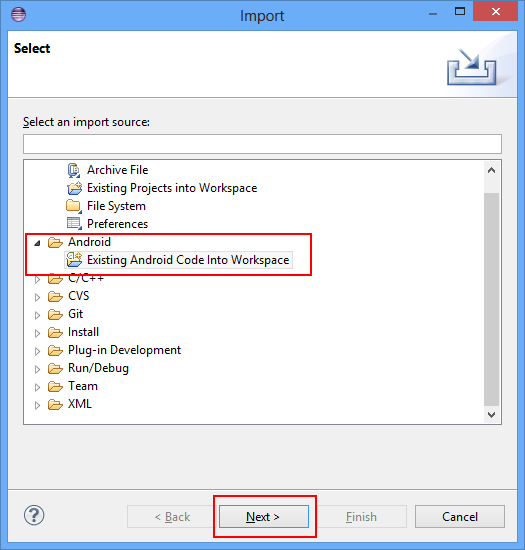
Step 3:

Right click on your project > properties > Android > select the new available, imported google_play_services_lib by pressing add as shown:


Step 4:

In your project manifest make sure you have defined the followed entries:

Step 5:

In your activity_main.xml layout define (anywhere you want and need) a linearlayout like this:

Step 6:

On the top of your MainActivity define those private variables. Please NOTE, that the MY_AD_UNIT_ID is a ID you'll get as soon as you have your AdMob account. The id bellow is a fake one. (you don't want my ID right? ;)

Step 7:

At the end of your onCreate() method of MainActivity.java call the method createAdView() like definition bellow: (create it in your own) 


Then make sure you have the following entries in the methods onPause, onDestroy and onResume:

That's all! You should now be able to run it and if you are connected with the internet, you will see your first advertisement banner on the screen in the place you've defined.

Hope you like it. ;) 

😱👇 PROMOTIONAL DISCOUNT: BOOKS AND IPODS PRO ðŸ˜±ðŸ‘‡

Be sure to read, it will change your life!
Show your work by Austin Kleonhttps://amzn.to/34NVmwx

This book is a must read - it will put you in another level! (Expert)
Agile Software Development, Principles, Patterns, and Practiceshttps://amzn.to/30WQSm2

Write cleaner code and stand out!
Clean Code - A Handbook of Agile Software Craftsmanship: https://amzn.to/33RvaSv

This book is very practical, straightforward and to the point! Worth every penny!
Kotlin for Android App Development (Developer's Library): https://amzn.to/33VZ6gp

Needless to say, these are top right?
Apple AirPods Pro: https://amzn.to/2GOICxy

😱👆 PROMOTIONAL DISCOUNT: BOOKS AND IPODS PRO ðŸ˜±ðŸ‘†

Tuesday, April 8, 2014

Applying decorator pattern to decorate views on Android

Hi there!

Today i'm gonna show how to apply the design pattern decorator to android's views making use of its dependency injection's concept. I thought it was a nice, clear and simple way to decorate views and that's my motivator to share it with you. I'm assuming you know the decorator pattern already and are looking for real examples involving android. If you are trying to understand the concept behind it, this is also a good article but you may need to learn the fundamentals first. There are a bunch of good books out there. I personally recommend head first.

In this example i'll try to show how to decorate a view with icons dynamically. Something similar to eclipse's tree decoration while some compile error or warning appears on the package structure. We will end up with something like that:

Error/warning tree 
decoration in eclipse


Our view decoration 
examplein Android

Let's visualize the structure by defining the UML-diagram


First create a blank android's project

Put some icons of your choice in the folder drawable-yourChoice. In my example i took the drawable-xhdpi. I took the icons directly from my eclipse package. You may use your own icons.

Layouting the view

Ok, now copy this code into your activity_main.xml layout:
< RelativeLayout xmlns:android="http://schemas.android.com/apk/res/android"
    xmlns:tools="http://schemas.android.com/tools"
    android:layout_width="match_parent"
    android:layout_height="match_parent"
    android:paddingBottom="@dimen/activity_vertical_margin"
    android:paddingLeft="@dimen/activity_horizontal_margin"
    android:paddingRight="@dimen/activity_horizontal_margin"
    android:paddingTop="@dimen/activity_vertical_margin"
    tools:context=".MainActivity" >

    < ImageView
        android:id="@+id/middle"
        android:layout_width="200dp"
        android:layout_height="200dp"
        android:layout_centerHorizontal="true"
        android:layout_centerVertical="true"
        android:src="@drawable/ic_launcher" / >

    < ImageView
        android:id="@+id/leftTop"
        android:layout_width="30dp"
        android:layout_height="30dp"
        android:layout_alignLeft="@+id/middle"
        android:layout_alignTop="@+id/middle"
         / >

    < ImageView
        android:id="@+id/rightTop"
        android:layout_width="30dp"
        android:layout_height="30dp"
        android:layout_alignRight="@+id/middle"
        android:layout_alignTop="@+id/middle"
         / >

    < ImageView
        android:id="@+id/leftBottom"
        android:layout_width="30dp"
        android:layout_height="30dp"
        android:layout_alignBottom="@+id/middle"
        android:layout_alignLeft="@+id/middle"
         / >

    < ImageView
        android:id="@+id/rightBottom"
        android:layout_width="30dp"
        android:layout_height="30dp"
        android:layout_alignBottom="@+id/middle"
        android:layout_alignRight="@+id/middle"
         / >

    < ImageView
        android:id="@+id/middleTop"
        android:layout_width="30dp"
        android:layout_height="30dp"
        android:layout_alignTop="@+id/middle"
        android:layout_centerHorizontal="true"
         / >

< / RelativeLayout >

The common decorator interface

Well ok, let's start by defining the common decorator interface:
/**
 * The common decorable interface to be used while implementing decorators.
 * @author Ricardo Ferreira
 * @version 1.0
 * @since 07/04/2014
 */
public interface Decorable {
    /** implements the concrete decorator's behavior */
    void decorate();
}

Defining the decorators contract

This class defines what kind of object we want to decorate. In our case an android's view which belongs to the Android's API itself:
import java.util.Arrays;
import android.content.Context;
import android.view.View;
/**
 * Used to define the decorator's contract. In this case to decorate a view with icons
 * @author Ricardo Ferreira
 * @version 1.0
 * @since 07/04/2014
 */
public abstract class AbstractIconDecorator implements Decorable{
    
    protected View view;
    protected View[] views;
    protected int drawableId;
    protected Context context;
    /**
     * Concrete classes must call this constructor to conform the decorator's contract.
     * @param context the app's context
     * @param view the view to be decorated
     * @param drawableId the drawable id dependency over R.drawable.yourId to be set 
     * as background to the view of this constructor.
     */
    public AbstractIconDecorator(Context context, View view, int drawableId){
        super();
        this.view = view;
        this.context = context;
        this.drawableId = drawableId;
        decorate();
    }
    /**
     * Concrete classes must call this constructor to conform the undo decorator's contract.
     * @param context context the app's context
     * @param views the views to be undone. 
     */
    public AbstractIconDecorator(Context context,View[] views){
        super();
        this.context = context;
        this.views = Arrays.copyOf(views, views.length);
        decorate();
    }
}

Implementing a master icon decorator

This is a very nice implementation that takes advantage of android's concept of dependency injection over the resource class R.drawable.myId. Using it, we don't have to implement a lot of decorators. Instead of it, we implement just one and inject our dependencies according to our needs as you will see.
import android.content.Context;
import android.view.View;
/**
 * Use this class to decorate views with icons thru dependency injection passing R.drawable.yourId
 * @author Ricardo Ferreira
 * @version 1.0
 * @since 07/04/2014
 */
public class IconDecorator extends AbstractIconDecorator{

    /**
     * Creates an universal icon decorator to be used while dealing with view's decoration.
     * @param context the app's context
     * @param view the view to be decorated
     * @param drawableId the drawable id dependency over R.drawable.yourId to be set 
     * as background to the view of this constructor.
     */
    public IconDecorator(Context context,View view, int drawableId){
        super(context, view, drawableId);
    }
    @Override
    public void decorate() {
        view.setBackground(context.getResources().getDrawable(drawableId));
    } 
} 

Implementing an undo decorator to revert decorations

This is a special kind of decoration. I will decorate the main icon(the android's green robot icon) with "nothing" making all decorations disappear.
/**
 * Use this decorator to undo decoration by passing the view to be undone.
 * @author Ricardo Ferreira
 * @version 1.0
 * @since 07/04/2014
 */
public class ClearIconDecorator extends AbstractIconDecorator{

    /**
     * Creates an undo decorator.
     * @param context the app's context
     * @param views the views that has been decorated to be undone.
     */
    public ClearIconDecorator(Context context,View[] views){
        super(context,views);
    }
    @Override
    public void decorate() {
        for (View view : views) {
            view.setBackground(null);
        }
    } 
}

The main activity

Now the final step before running it. In this example i am simulating the decoration over clicks. But in your professional applications those decorations may occur while something go wrong or right or you may need to give some visual user feedbacks while doing something. Use your imagination ;)
import android.app.Activity;
import android.os.Bundle;
import android.view.View;
import android.view.View.OnClickListener;

public class MainActivity extends Activity implements OnClickListener{

    private View middle;
    private View leftTop;
    private View leftBottom;
    private View rightBottom;
    private View rightTop;
    private View middleTop;
    
    @Override
    protected void onCreate(Bundle savedInstanceState) {
        super.onCreate(savedInstanceState);
        setContentView(R.layout.activity_main);
        
        middle = findViewById(R.id.middle);
        leftTop = findViewById(R.id.leftTop);
        leftBottom = findViewById(R.id.leftBottom);
        rightBottom = findViewById(R.id.rightBottom);
        rightTop = findViewById(R.id.rightTop);
        middleTop= findViewById(R.id.middleTop);
        
        leftTop.setOnClickListener(this);
        leftBottom.setOnClickListener(this);
        rightBottom.setOnClickListener(this);
        rightTop.setOnClickListener(this);
        middle.setOnClickListener(this);
        middleTop.setOnClickListener(this);
    }

    @Override
    public void onClick(View view) {
        switch (view.getId()) {
            
        case R.id.leftTop:
            new ErrorIconDecorator(view);
            break;
            
        case R.id.leftBottom:
            new WarningIconDecorator(view);
            break;
            
        case R.id.rightTop:
            new InfoIconDecorator(view);
            break;
            
        case R.id.rightBottom:
            new QuickFixIconDecorator(view);
            break;
            
        case R.id.middleTop:
            new IconDecorator(this,view, R.drawable.newpack_wiz);
            break;
            
        case R.id.middle:
            final View[] views = new View[]{leftTop,leftBottom,rightTop,rightBottom,middleTop};
            new UndoIconDecorator(views);
            break;
        default:
            break;
        }
    }
    
    // you may define specific decorators to your convenience... 
    // ... or you may use directly the universal decorator IconDecorator(...). 
    // It is up to your. Here i'm showing both examples
    
    public class WarningIconDecorator{
        public WarningIconDecorator(View view){
            new IconDecorator(MainActivity.this, view, R.drawable.warning_obj);
        }
    }
    
    public class ErrorIconDecorator {
        public ErrorIconDecorator(View view){
            new IconDecorator(MainActivity.this, view, R.drawable.error);
        }
    }
    
    public class InfoIconDecorator {
        public InfoIconDecorator(View view){
            new IconDecorator(MainActivity.this, view, R.drawable.information);
        }
    }
    
    public class PackageDecorator {
        public PackageDecorator(View view){
            new IconDecorator(MainActivity.this, view, R.drawable.package_obj);
        }
    }
    
    public class QuickFixIconDecorator {
        public QuickFixIconDecorator(View view){
            new IconDecorator(MainActivity.this, view, R.drawable.quickfix_error_obj);
        }
    }
    
    public class ErrorWarningDecorator {
        public ErrorWarningDecorator(View view){
            new IconDecorator(MainActivity.this, view, R.drawable.errorwarning_tab);
        }
    }
    
    public class UndoIconDecorator{
        public UndoIconDecorator(View[] views){
            new ClearIconDecorator(MainActivity.this, views);
        }
    }
}
So that's all. Hope you like it.
 
😱👇 PROMOTIONAL DISCOUNT: BOOKS AND IPODS PRO ðŸ˜±ðŸ‘‡

Be sure to read, it will change your life!
Show your work by Austin Kleonhttps://amzn.to/34NVmwx

This book is a must read - it will put you in another level! (Expert)
Agile Software Development, Principles, Patterns, and Practiceshttps://amzn.to/30WQSm2

Write cleaner code and stand out!
Clean Code - A Handbook of Agile Software Craftsmanship: https://amzn.to/33RvaSv

This book is very practical, straightforward and to the point! Worth every penny!
Kotlin for Android App Development (Developer's Library): https://amzn.to/33VZ6gp

Needless to say, these are top right?
Apple AirPods Pro: https://amzn.to/2GOICxy

😱👆 PROMOTIONAL DISCOUNT: BOOKS AND IPODS PRO ðŸ˜±ðŸ‘†

Thursday, April 3, 2014

How to create an ImageLoader for a huge amount of images on Android

Hi there!

During development with a huge amount of images, most of all image loaders available out there, does not display(caches) the images smoothlty. For this reason, i have tryed to put all the code "pieces" i found in the internet together to get a almost perfect image loader for my application. The result is shown bellow. It works very well for me. It may be also interesting for other developers. Here is my solution:

The Loader interface

/**
 * Drawable loader used to create and cache thumbnails while presenting it in a gallery preview.
 * IMPORTANT: instantiate it in your main activity like this:
 * 

 * protected void onCreate(final Bundle savedInstanceState) {
 *       super.onCreate(savedInstanceState);
 *       ...
 *       DrawableLoader.getInstance(this);
 *       ...
 *   }
 * 
 * 
* @author Ricardo Ferreira * @version 1.0 * @since 03/04/2014 */ public interface Loader { /** * Clears all instance data and stops running threads */ public void Reset() ; /** * Loads a drawable into an image. Call this method inside of getView(...) from your concrete * implementation of BaseAdapter. *
     * public View getView(int position, View convertView, ViewGroup parent){
     * ...
     * String url = PATH_FILE + pathImage;// path to your storage like "/storage/..."
     * ImageView imageView = (ImageView)holder.imgView;
     * final Drawable placeholder = mContext.getResources().getDrawable(R.drawable.placeholder);
     * DrawableLoader.getInstance(mContext).loadDrawable(url, imageView, placeholder);
     * ...
     * }
     * 
* @param url file path to the storage location * @param imageView the image to be presented in a list view or grid view * @param placeholder the place holder image to be shown, while the loading is running. */ public void loadDrawable(final String url, final ImageView imageView, Drawable placeholder); }

The Loader implementation

/**
 * Drawable loader used to create and cache thumbnails while presenting it in a gallery preview.
 * IMPORTANT: instantiate it in your main activity like this:
 * 

 * protected void onCreate(final Bundle savedInstanceState) {
 *       super.onCreate(savedInstanceState);
 *       ...
 *       DrawableLoader.getInstance(this);
 *       ...
 *   }
 * 
 * 
* @author Ricardo Ferreira * @version 1.0 * @since 03/04/2014 */ @SuppressLint("HandlerLeak") public class DrawableLoader implements Loader{ private final Map < String, SoftReference < Drawable > > mCache = new HashMap < String, SoftReference < Drawable > >(); private final LinkedList < Drawable > mChacheController = new LinkedList < Drawable > (); private ExecutorService mThreadPool; private final Map < ImageView, String > mImageViews = Collections.synchronizedMap(new WeakHashMap < ImageView, String >()); public final static int MAX_CACHE_SIZE = 1024; public final int THREAD_POOL_SIZE = 5; private Context mContext; private static Loader loader; // SINGLETON private DrawableLoader(Context context) { mThreadPool = Executors.newFixedThreadPool(THREAD_POOL_SIZE); mContext=context; } public static Loader getInstance(Context ctx){ if(loader==null){ loader = new DrawableLoader(ctx); } return loader; } public void Reset() { ExecutorService oldThreadPool = mThreadPool; mThreadPool = Executors.newFixedThreadPool(THREAD_POOL_SIZE); oldThreadPool.shutdownNow(); mChacheController.clear(); mCache.clear(); mImageViews.clear(); } public void loadDrawable(final String url, final ImageView imageView, Drawable placeholder) { mImageViews.put(imageView, url); Drawable drawable = getDrawableFromCache(url); if (drawable != null) { imageView.setImageDrawable(drawable); } else { imageView.setImageDrawable(placeholder); queueJob(url, imageView, placeholder); } } private Drawable getDrawableFromCache(String url) { if (mCache.containsKey(url)) { return mCache.get(url).get(); } return null; } private synchronized void putDrawableInCache(String url, Drawable drawable) { int chacheControllerSize = mChacheController.size(); if (chacheControllerSize > MAX_CACHE_SIZE){ mChacheController.subList(0, MAX_CACHE_SIZE / 2).clear(); } mChacheController.addLast(drawable); mCache.put(url, new SoftReference(drawable)); } private void queueJob(final String url, final ImageView imageView, final Drawable placeholder) { /* Create handler in UI thread. */ final Handler handler = new Handler() { @Override public void handleMessage(Message msg) { String tag = mImageViews.get(imageView); if (tag != null && tag.equals(url)) { if (imageView.isShown()) if (msg.obj != null) { imageView.setImageDrawable((Drawable) msg.obj); } else { imageView.setImageDrawable(placeholder); } } } }; mThreadPool.submit(new Runnable() { @Override public void run() { final Drawable bmp = downloadDrawable(url); // if the view is not visible anymore, //the image will be ready for next time in cache if (imageView.isShown()) { Message message = Message.obtain(); message.obj = bmp; handler.sendMessage(message); } } }); } private Drawable downloadDrawable(String url) { final Bitmap decodeBitmap = ViewHelper.decodeBitmap(url.replaceAll("file://", ""), 100); Drawable drawable = new BitmapDrawable(mContext.getResources(), decodeBitmap); putDrawableInCache(url, drawable); return drawable; } /** pass new URL(urlString) to it, while urlString is the path to the drawable like: * http://www.google.com.br/images/your_image.png */ protected Drawable downloadDrawable(URL url) { try { InputStream is = getInputStream(url); Drawable drawable = Drawable.createFromStream(is, url.getPath()); putDrawableInCache(url.getPath(), drawable); return drawable; } catch (MalformedURLException e) { e.printStackTrace(); } catch (IOException e) { e.printStackTrace(); } return null; } private InputStream getInputStream(URL url) throws MalformedURLException, IOException { //URL url = new URL(urlString); URLConnection connection; connection = url.openConnection(); connection.setUseCaches(true); connection.connect(); InputStream response = connection.getInputStream(); return response; } }

That's all. Hope you like it! ;)

😱👇 PROMOTIONAL DISCOUNT: BOOKS AND IPODS PRO ðŸ˜±ðŸ‘‡

Be sure to read, it will change your life!
Show your work by Austin Kleonhttps://amzn.to/34NVmwx

This book is a must read - it will put you in another level! (Expert)
Agile Software Development, Principles, Patterns, and Practiceshttps://amzn.to/30WQSm2

Write cleaner code and stand out!
Clean Code - A Handbook of Agile Software Craftsmanship: https://amzn.to/33RvaSv

This book is very practical, straightforward and to the point! Worth every penny!
Kotlin for Android App Development (Developer's Library): https://amzn.to/33VZ6gp

Needless to say, these are top right?
Apple AirPods Pro: https://amzn.to/2GOICxy

😱👆 PROMOTIONAL DISCOUNT: BOOKS AND IPODS PRO ðŸ˜±ðŸ‘†

Tuesday, April 1, 2014

How to extract ARGB components from color int value

Hi there!

Today i'm gonna show how to extract the color's component Alpha, Red, Green and Blue from an integer value that presents a specific color. The code is very simple and self-explanatory.

/**
     * Returns the color components as alpha, red, green and blue parts in an array.
     * 

     * argb[0] = alpha value
     * argb[1] = red value
     * argb[2] = green value
     * argb[3] = blue value
     * 
* @param color the color value * @return the array containing the color components */ public static int[] getARGB(int color) { /** * Shift all pixels 24 bits to the right. * Do a logical and with 0x000000FF * i.e. 0000 0000 0000 0000 0000 0000 1111 1111 * You will get the alpha value for the color */ int alpha = (color >> 24) & 0x000000FF; /** * Shift all pixels 16 bits to the right. * Do a logical and with 0x000000FF * i.e. 0000 0000 0000 0000 0000 0000 1111 1111 * You will get the red value for the color */ int red = (color >> 16) & 0x000000FF; /** * Shift all pixels 8 bits to the right. * Do a logical and with 0x000000FF * i.e. 0000 0000 0000 0000 0000 0000 1111 1111 * You will get the green value for the color */ int green = (color >>8 ) & 0x000000FF; /** * Dont do any shift. * Do a logical and with 0x000000FF * i.e. 0000 0000 0000 0000 0000 0000 1111 1111 * You will get the blue value for the color */ int blue = (color) & 0x000000FF; return new int[]{alpha,red,green,blue}; } public static int manipulateAlpha(int color, int newAlpha) { final int[] argb = getARGB(color); return Color.argb(random.nextInt(argb[0]), argb[1], argb[2], argb[3]); }


😱👇 PROMOTIONAL DISCOUNT: BOOKS AND IPODS PRO ðŸ˜±ðŸ‘‡

Be sure to read, it will change your life!
Show your work by Austin Kleonhttps://amzn.to/34NVmwx

This book is a must read - it will put you in another level! (Expert)
Agile Software Development, Principles, Patterns, and Practiceshttps://amzn.to/30WQSm2

Write cleaner code and stand out!
Clean Code - A Handbook of Agile Software Craftsmanship: https://amzn.to/33RvaSv

This book is very practical, straightforward and to the point! Worth every penny!
Kotlin for Android App Development (Developer's Library): https://amzn.to/33VZ6gp

Needless to say, these are top right?
Apple AirPods Pro: https://amzn.to/2GOICxy

😱👆 PROMOTIONAL DISCOUNT: BOOKS AND IPODS PRO ðŸ˜±ðŸ‘†